Templates were a starting point, not governance
Authors could drift from the intended structure, work around layouts, or create slides that looked close enough visually but were difficult to validate programmatically.
Product Story 02 / Anonymized
Turning messy PowerPoint workflows into structured slide data.
Presentation decks were not the problem because people could not design slides. The problem was that slides had become the place where everything collided: branding, templates, authoring rules, content standards, review workflows, and eventually AI.
A `.pptx` file looks clean on the surface. Underneath, it is messy: shapes, XML, placeholders, layout references, grouped objects, styling, theme data, and content all tangled together.
Thesis questionWhat if the PowerPoint file was not the source of truth?
The template system solved part of the problem, but not the whole workflow.
Templates gave authors a starting point. They did not guarantee that slides stayed compliant after authors began editing them.
Over time, authors could drift from the intended structure. They could work around layouts, change things manually, or create slides that looked close enough visually but were difficult to validate programmatically.
Branding changes created another issue. When the visual system changed, existing decks in the library still had to be updated manually. The template could change, but the old presentations did not automatically inherit that change.
At the same time, AI introduced a new layer of complexity.
Slides are not just text. They contain layout, visual hierarchy, instructional intent, object relationships, and presentation logic. But PowerPoint stores all of that in ways that are noisy and difficult to reason about.
Authors could drift from the intended structure, work around layouts, or create slides that looked close enough visually but were difficult to validate programmatically.
When the visual system changed, existing decks in the library still had to be updated by hand. The template could change, but old presentations did not automatically inherit that change.
Slides contain instructional intent, layout, and object relationships, but PowerPoint stores that data in ways that are difficult to reason about programmatically or feed reliably into AI workflows.
I realized the useful content needed to be separated from the PowerPoint file without losing the value of the slide. That was the product problem.
The bet was that a downloaded `.pptx` should not be the canonical source of truth.
The PowerPoint file could still be an input and an output, but the real working layer needed to be structured data.
That structured layer could describe what was actually on the slide: the title, body content, layout, shape IDs, instructional purpose, required elements, visual structure, standards state, and the pieces AI could safely work with.
Once the slide existed as structured JSON, the workflow changed. The product could inspect it, validate it, edit it, render it, prepare it for HTML, use it as cleaner input for AI, and eventually regenerate or transform it.
The shiftThe important shift was not “Can AI make PowerPoint slides?” It was “Can we turn presentation files into structured slide data that authors, reviewers, designers, and AI can all work from?”
I designed and built the full workflow.
This was not only a UI project or an AI experiment. It was a creative technology project: design, code, data modeling, enterprise constraints, and product workflow all tied together.
The system started as a PowerPoint add-in that checked slides against authoring standards.
To do that, the add-in had to understand the slide.
That meant extracting slide content into a custom JSON schema: not just the visible text, but the slide elements, structure, and metadata needed to evaluate whether the slide followed the expected rules.
That changed how I thought about the product.
If I could extract the slide into JSON for validation, then the JSON layer could become much more than a checking tool. It could become the working model.
From there, the product moved from “check this PowerPoint file” toward “create a structured slide system that can support validation, editing, AI generation, and HTML presentation output.”
The `.pptx` file still mattered, but it was not the cleanest layer for the product to reason about. PowerPoint was too visual, too flexible, and too messy internally. Authors could make something look right while still breaking the structure underneath. The structured JSON layer gave the system something more stable to inspect, validate, and eventually regenerate.
Slides contain a lot of data that does not directly matter to the instructional content. Some of that data is necessary for rendering, but a lot of it is noise when the goal is to understand what the slide is actually communicating. The product needed to separate the meaningful content from the PowerPoint-specific complexity around it.
The first practical problem was standards checking. Before AI could be useful, the system needed to know whether a slide was structured correctly, followed the expected rules, and included the required content elements. That meant validation had to come before generation.
Authors were already working in PowerPoint. The workflow could not ignore existing habits, templates, and production expectations. The product had to meet authors inside PowerPoint first, then gradually move the source of truth into a more structured layer.
The custom schema became the bridge between PowerPoint, standards checking, HTML output, and AI readiness. It allowed the same slide to be understood as a visual slide, structured JSON, validation data, potential HTML content, and cleaner AI input.
I built the PowerPoint add-in and the broader structured slide workflow around it. The add-in inspected slides, extracted content, and returned standards-related feedback inside PowerPoint.
The first version solved a practical problem: authors needed a way to check whether their slides followed expected authoring standards. But the deeper value came from what that required underneath: a structured representation of slide content.
The visuals shown for this project are sanitized recreations, not screenshots of the proprietary product. They are meant to explain the workflow, not reveal the original interface or internal implementation.
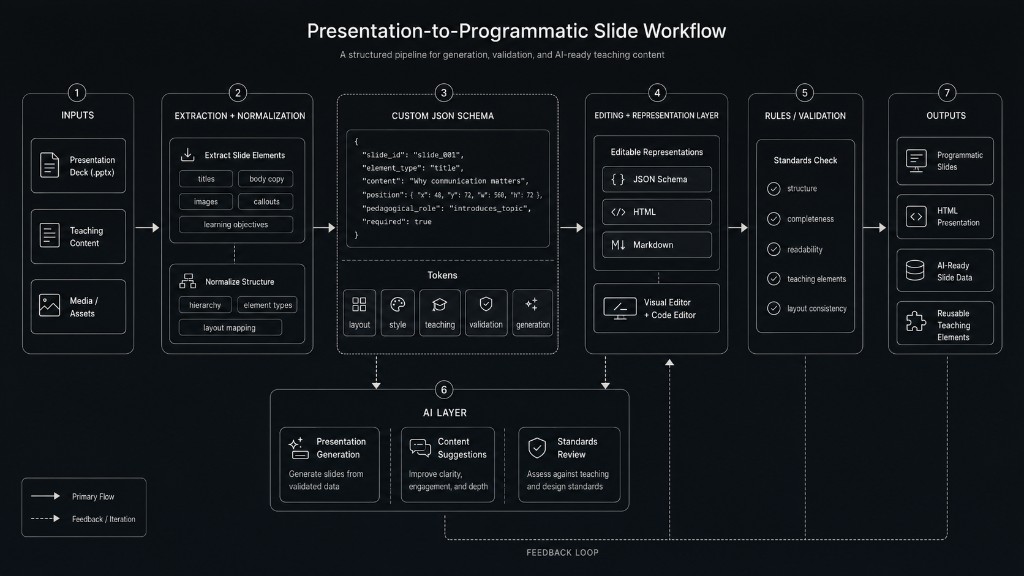
This diagram shows the larger system shape: PowerPoint input, slide extraction, custom JSON schema, editing layers, validation, AI assistance, and structured outputs. The important part is that JSON sits at the center. That structured model becomes the place where the slide can be inspected, edited, checked, and prepared for AI workflows.
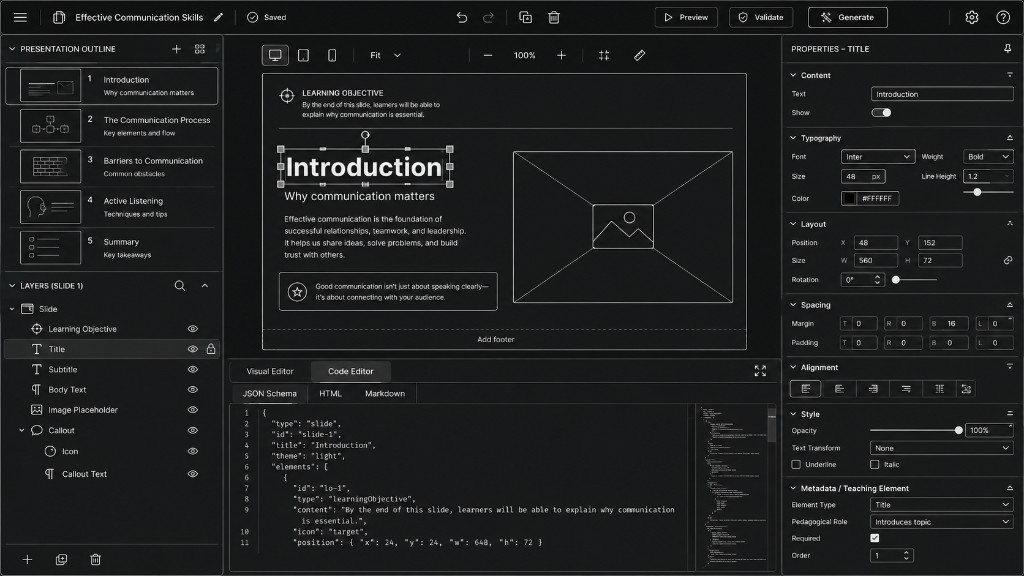
The editor concept shows how the same slide could be understood across multiple surfaces. A user can see the slide visually, inspect the outline, view slide layers, edit properties, and inspect the structured JSON behind the slide. The concept is not about recreating the original product screen. It is about showing the product idea: the slide is no longer just a PowerPoint file. It is a structured object that can be viewed, edited, validated, and eventually rendered in different ways.
The work reframed the problem. Instead of treating presentation work as a template-download problem, the product treated it as a structured content workflow.
Authors could see standards issues closer to where they were working.
Slide content could be inspected as structured JSON instead of only existing as a static PowerPoint file.
Reviewers had a clearer path to evaluate compliance.
The system reduced dependence on downloaded templates as the only control mechanism.
The workflow created a path toward AI-ready slide generation from structured data instead of raw `.pptx` noise.
The workflow created a path toward HTML slide output from the same structured model.
Most importantly, it created a foundation. Once the slide could be represented outside of PowerPoint, the product could start moving toward editing, validation, regeneration, and AI assistance from a shared source of truth.
I learned that PowerPoint is easy to underestimate.
A slide looks simple to a person, but programmatically it can be extremely complex. The visible design is only one layer. Underneath that are shapes, IDs, XML, references, layout rules, theme data, and hidden structure.
I also learned that AI generation is usually not the first problem to solve. The harder problem is preparing the data.
If the source material is messy, AI will guess. If the structure is unclear, AI will hallucinate. If the standards are not explicit, AI cannot reliably follow them.
The useful insight was not “AI can make slides.” The useful insight was “AI needs a structured slide model before it can help with slide workflows in a reliable way.”
That is what made this project feel like creative technology work. It was design, engineering, data modeling, author workflow, enterprise constraints, and AI product thinking all at once.
This project is one of the clearest examples of how I think as a creative technologist.
I did not just build a PowerPoint tool.
I found the system underneath a messy workflow and turned it into something structured enough for people, validation rules, and AI to work with.